
Frequently asked questions
Answers to the most common questions, one line each. Click a question for the details.
| Question | Short answer |
|---|---|
| Address and version? | wiki.astralya.net, 26.3, Bedrock port 19132 |
| I died? | /dback takes you back to where you died; lost equipment is not refunded |
| PvP? | Only in /duel and at the /pvp arena |
| Break a spawner? | Yes with the Astralis rank, without Silk Touch |
| World resets? | Resource, Nether and End about every 2 months; the build world never |
| Restart? | Every day at 06:00, French time |
| Server shop? | None: buy from players (/ah, /recherche) |
| Change my username? | Have your data transferred through a ticket (details below) |
| Voice chat? | Proximity voice chat requires Java and the Simple Voice Chat mod |
The texture pack does not load
- In your server list, click Astralya.
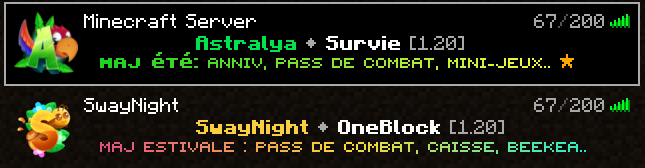
- Click Edit, at the very bottom.

- Accept the server's resource packs.
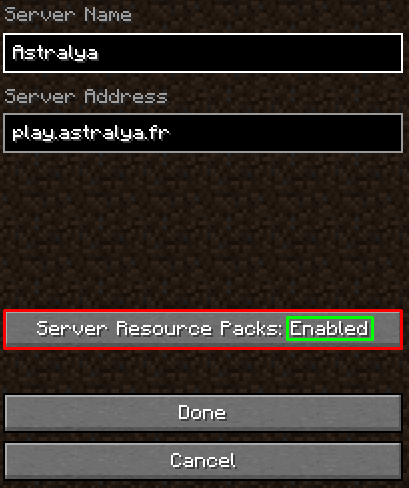
- Reconnect. If the pack still does not load, open a ticket on the Discord.
I can't read the menus
In your video settings, set the GUI scale to 2.

Allowed mods (Schematica, Litematica, minimap)
Mods that give no unfair advantage and do not change the game mechanics are allowed. Schematica and Litematica are accepted, without their "print" mode. The Nether roof is forbidden. Details in the rules.
Technical limits and farms
| Limit | Value |
|---|---|
| Passive and hostile entities | 16 per chunk |
| Hoppers | 50 per chunk |
| Block entities (chests, furnaces…) | 256 per chunk |
| Heads | 15 per chunk |
| Maximum height | 319 blocks |
| Simulation distance | 3 chunks |
| View distance | 7 chunks |
Identical mobs and items are merged into stacks to lighten the server, without changing farm yields; the Warden and the sulfur cube are not merged. No farm is banned by default, except anti-AFK systems. A build that endangers the server's stability can be limited. The difficulty is Normal.
Spawners without the Astralis rank
Ask an Astralis player to break the spawner for you; if they refuse, ask someone else. In the resource worlds, a mined spawner breaks and cannot be recovered.
Resource world resets
An announcement is posted on Discord on the day of the reset. Redstone is disabled there, except TNT and hoppers. After a reset, elytras are blocked in the End for 48 hours, and be careful when teleporting to your /homes set in those worlds. See Server places.
If I stop connecting
Accounts inactive for 90 days are deleted. Your towns may expire before that: their chests are then no longer protected, except those with a sign. Deadlines are on the Towns page.
I am changing my username
Your progress is tied to your username: if you change it, you start over with an empty account, unless you have your data transferred.
- Open a ticket on the Discord of Astralya.
- Connect both accounts at the same time and keep them connected until the end.
- Move the following to the new account yourself: inventory, armor,
/sac, Ender chest, items for sale in/ah, warps (/warp setowner "NomDuWarp" "NouveauPseudo") and towns (/ville edit "NomDeLaVille", then/ville setowner "pseudo"). For other people's towns, ask the mayor to invite your new account. Then write in your ticket that it is done. - Once the ticket is handled, start the automatic transfer with
/transfertcompteand follow its steps in order.
The transfer moves money, rubies, gold coins, shops, homes, playtime, /vol time, vanilla XP, jobs, rank, permissions and other data, then deletes them from the old account. Quest progress does not follow.
It gives you back the /prewards rewards: put them in a chest and give its coordinates in your ticket, along with the money and rubies received twice (for example: "The rewards are in the chest at -1 2 -3. I also earned 50 rubies and 50000$.").
If you disconnect an account along the way, data may be overwritten with no way back, and a loss caused by a skipped step is not refunded.